Instant Table Assistance
With Smart Waiter Requests
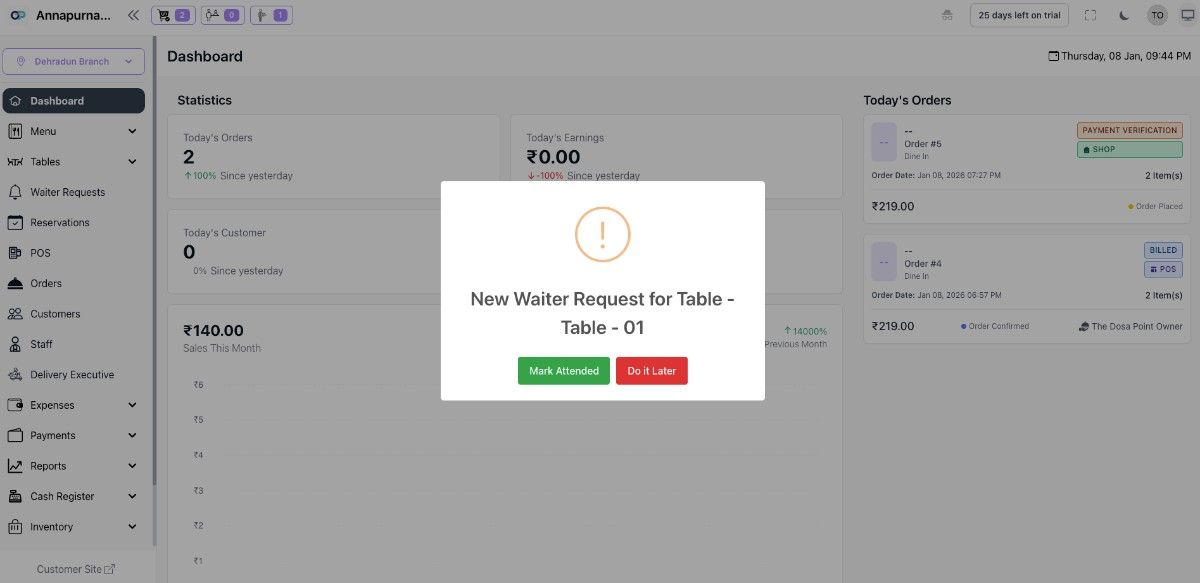
Guests scan a QR code and choose what they need in seconds. Waiters receive real-time notifications with table number and request type — no shouting, no waving, no missed calls.
How it works
Simple 4-Step Request Flow
From guest tap to waiter response — in under 10 seconds.
Each table has a unique QR code. Guests scan it instantly with their phone camera — no app download or login needed.
Choose from bill, water refill, call waiter, extra cutlery, clean table or a custom request — all with a single tap.
Staff receive an instant alert — sound, vibration and visual pop-up — showing table number, request type and priority level.
Waiter marks the request as attended. The system logs response time and the guest sees a confirmation instantly.
Request Options
Every Type of Guest Need Covered
Comprehensive request types for any dining scenario — fully customisable on paid plans.
Priority alert for checkout — speeds up table turnover without any awkward waving.
General assistance request — gets a staff member to the table right away.
Quick request for water top-up — handled in seconds without interrupting service flow.
Request additional plates, forks, spoons or napkins with one tap.
Ask questions about items or get personalised recommendations from staff.
Request removal of finished dishes or a quick wipe-down between courses.
High-priority alert for complaints — escalated to a manager instantly.
Type any specific need or special instruction freely — no request is too unique.
Live Display
A Waiter Display That Staff Actually Use
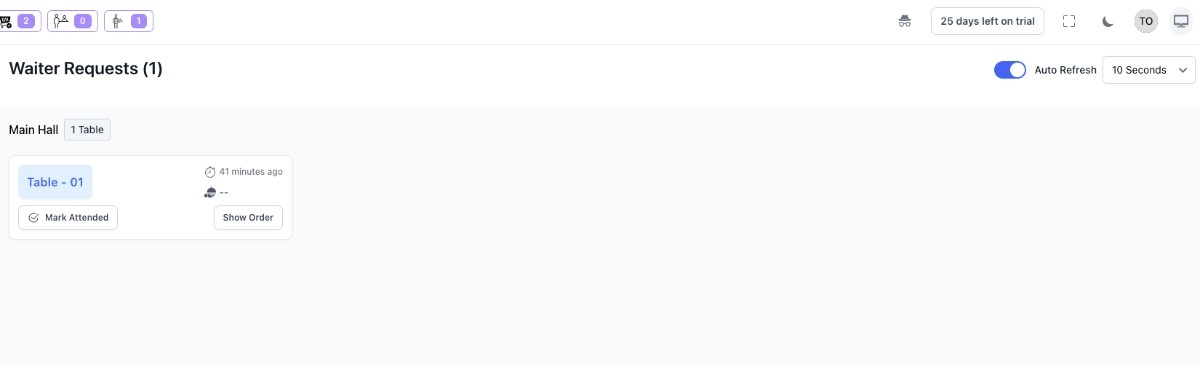
The live request board shows every open, pending and completed request in one clear interface. Staff respond from any device — phone, tablet or wall-mounted screen.
Phones, tablets and desktops all receive alerts simultaneously. No per-device fees.
Customisable audio and on-screen pop-ups ensure staff never miss a request even in busy kitchens.
Red for new, amber for pending, green for done — staff know exactly what needs attention at a glance.
Every alert clearly shows table number, section and assigned waiter — no guessing, no cross-table confusion.
Monitor how quickly staff attend each request. Identify slow periods and coach your team with concrete data.
Auto-route requests to the assigned waiter per section or rotate them evenly across your team for balanced workloads.
Understand peak request hours, busiest tables and most common request types to optimise staffing and operations.
Auto-escalate unattended requests to a manager after a configurable timeout — no request ever slips through.
Guests scan the QR code with their phone camera and the request menu opens instantly in their browser — zero friction.
Benefits
Why Restaurants Choose Our Request System
The real impact on your service, staff and bottom line.
Discreet, instant service requests mean guests never feel ignored — leading to better reviews and repeat visits.
Eliminating the need to wave down staff reduces average response time by up to 60% during peak service.
A centralised request board ensures every team member knows exactly what needs attending and when.
Response time reports and request patterns give managers the insight to continuously improve service quality.
Staff use their existing phones or tablets. No pagers, no buzzers — just a browser notification that works everywhere.
No shared physical buttons or buzzers — guests use their own device for a fully contactless service experience.
Free Plan
₹0.00 Pay Monthly
Best plan to start with. Create menu for your restaurant and let the customers check it out.
Get StartedSilver Plan
₹99.00 Pay Monthly
₹999.00 Pay Annually
Everything in Free + KOT, Waiter Calling, Reservations, Reports, Customer Display System
Get StartedGold Plan
₹199.00 Pay Monthly
₹1,999.00 Pay Annually
Everything in Silver Plan + Inventory, Cash Register, Expenses, Staff Management and Multiple Kitchen
Get StartedPlatinum Plan
₹499.00 Pay Monthly
₹4,999.00 Pay Annually
The complete package with payment gateway integration.
Get StartedBest plan to start with. Create menu for your restaurant and let the customers check it out.
₹99.00 Pay Monthly
₹999.00 Pay Annually
Everything in Free + KOT, Waiter Calling, Reservations, Reports, Customer Display System
₹199.00 Pay Monthly
₹1,999.00 Pay Annually
Everything in Silver Plan + Inventory, Cash Register, Expenses, Staff Management and Multiple Kitchen
₹499.00 Pay Monthly
₹4,999.00 Pay Annually
The complete package with payment gateway integration.
- App Update
-
-
-
-
- Restaurants
-
-
-
-
- Superadmin Payment
-
-
-
-
- Packages
-
-
-
-
- Billing
-
-
-
-
- Offline Request
-
-
-
-
- SuperAdmin
-
-
-
-
- Landing Site
-
-
-
-
- Superadmin Settings
-
-
-
-
- Menu
-
-
-
-
- Menu Item
-
20 per plan
-
500 per plan
-
Unlimited
-
Unlimited
- Item Category
-
-
-
-
- Area
-
-
-
-
- Table
-
-
-
-
- Reservation
-
-
-
-
- KOT
-
-
-
-
- Order
-
-
100 per day
-
Unlimited
-
Unlimited
- Customer
-
-
-
-
- Staff
-
-
Unlimited
-
Unlimited
-
Unlimited
- Report
-
-
-
-
- Delivery Executive
-
-
-
-
- Waiter Request
-
-
-
-
- Expenses
-
-
-
-
- Payment
-
-
-
-
- Settings
-
-
-
-
- Cash Register
-
-
-
-
- Inventory
-
-
-
-
- Kiosk
-
-
-
-
- Multiple Kitchen
-
-
-
-
- permissions.modules.Blog
-
-
-
-
- Loyalty
-
-
-
-
- Hotel
-
-
-
-
Testimonials
Trusted by Restaurants Across India
Hear from owners who transformed their table service.
"Our guests stopped waving their hands and started getting served faster. Response time is down by half and our Google ratings went up by a full star."
"The live display board on our kitchen screen changed everything. Staff know exactly which table needs what — no shouting, no confusion during rush hour."
"Setup took one afternoon. Our team adopted it in minutes and guests love being able to ask for the bill without making eye contact across a crowded room."
FAQ
Frequently Asked Questions
Everything you need to know about our waiter request system.
Ready to Eliminate Missed Requests?
Join thousands of restaurants using OnePe to deliver faster, smarter table service. Start your free trial today — no credit card required.
14-day free trial · No credit card needed · Cancel anytime