Serve More Customers Faster
With Smart Self-Ordering Kiosks
Customers browse your menu, customise their order and pay — all on their own. Staff receive instant kitchen tickets with zero errors, cutting queues and boosting revenue — no human bottleneck needed.
How it works
Complete Order Journey in 4 Simple Steps
From touch to kitchen ticket — entirely self-served, in seconds.
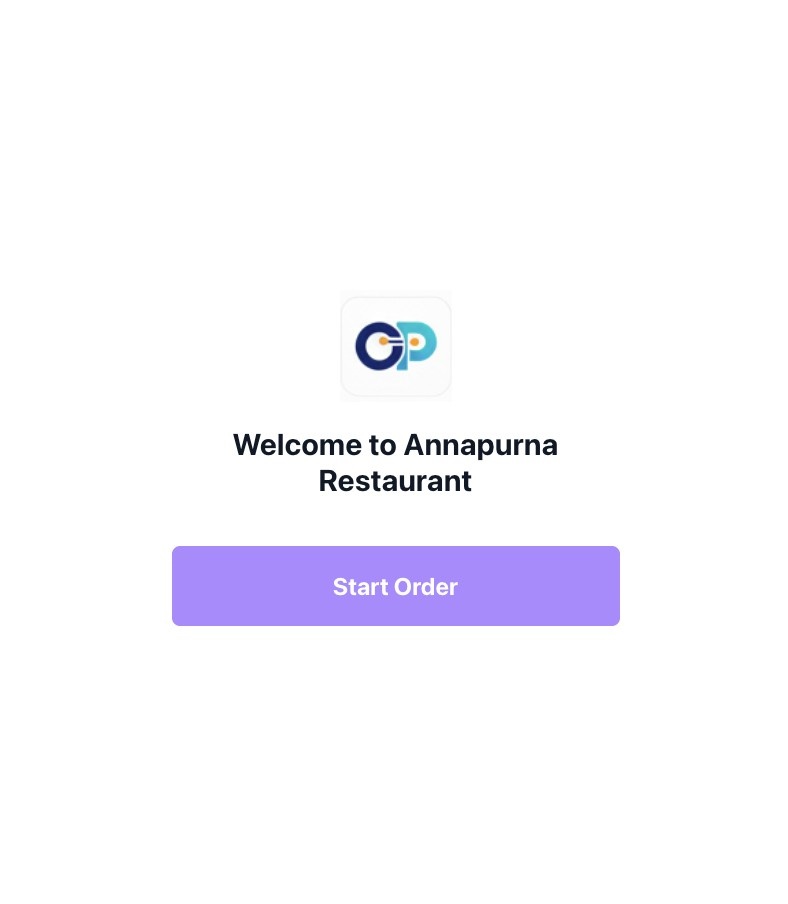
Customer walks up and taps the screen to wake the kiosk. A branded welcome screen greets them and prompts them to start ordering.
Browse categories, view high-res images, add extras, remove ingredients and see real-time price updates for every customisation.
Choose from UPI, card, contactless NFC or cash. Payments are processed securely in seconds with a clear confirmation screen.
Customer receives a token number. The kitchen gets the order ticket instantly. Staff can focus on cooking — not taking orders.
7-Step Journey
The Complete Customer Journey
Every touchpoint — from the welcome screen to the final confirmation — designed for speed and satisfaction.
First Impression Matters
Customers are greeted with a clean, brand-focused interface that immediately guides them to start ordering. Large, touch-friendly buttons make navigation effortless from the very first tap.
Your restaurant's colours, logo and fonts — no generic look.
Serve diverse customers across English, Hindi and regional languages.
Large text and high-contrast modes for every customer.
Screenshot 1
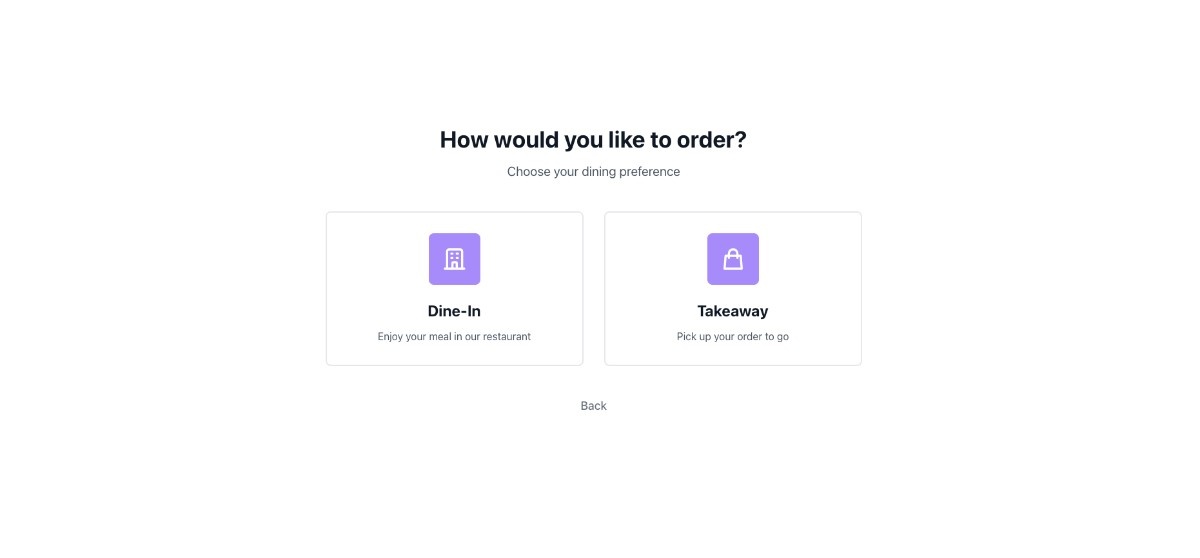
Choose Your Service
Clear dine-in, takeaway and delivery options let customers select the right service immediately, reducing confusion and order routing errors before they even start browsing.
Dine-in, takeaway or delivery — one tap to decide.
Show only the service types available at each outlet.
Dine-in customers enter their table number for accurate delivery.
 Screenshot 2
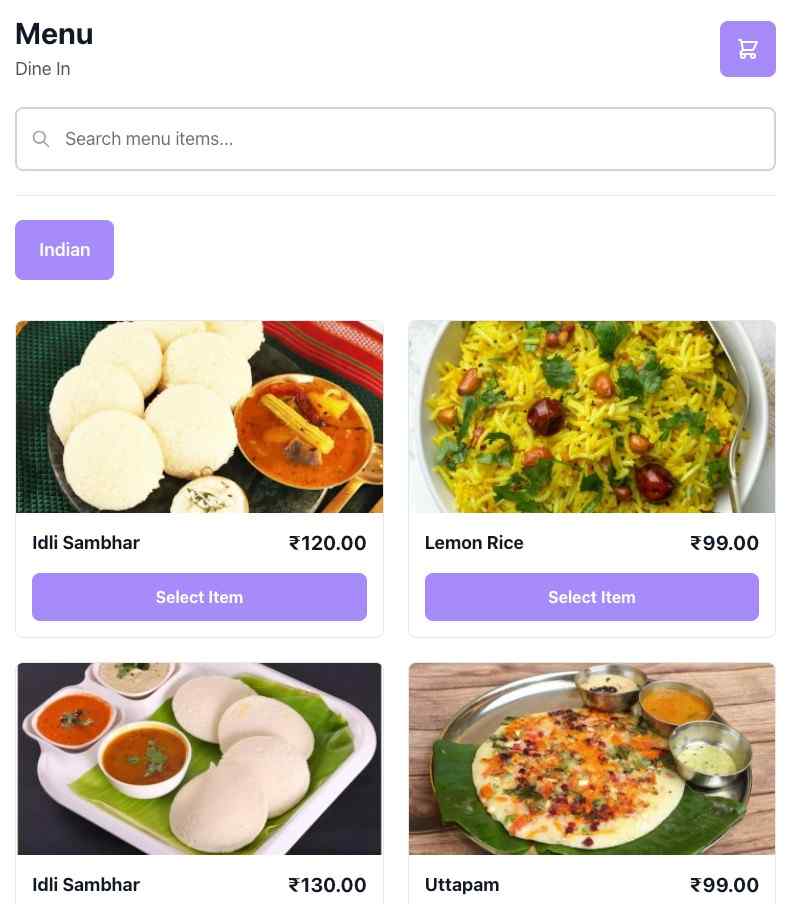
Explore the Full Menu
Beautiful high-resolution images and intuitive categorisation make browsing a pleasure. Smart search and filter tools help customers find exactly what they want — fast.
Mouth-watering images that upsell by themselves.
Starters, Mains, Drinks, Desserts — easy to navigate.
Veg/non-veg, gluten-free, and allergen info on every item.
Screenshot 3
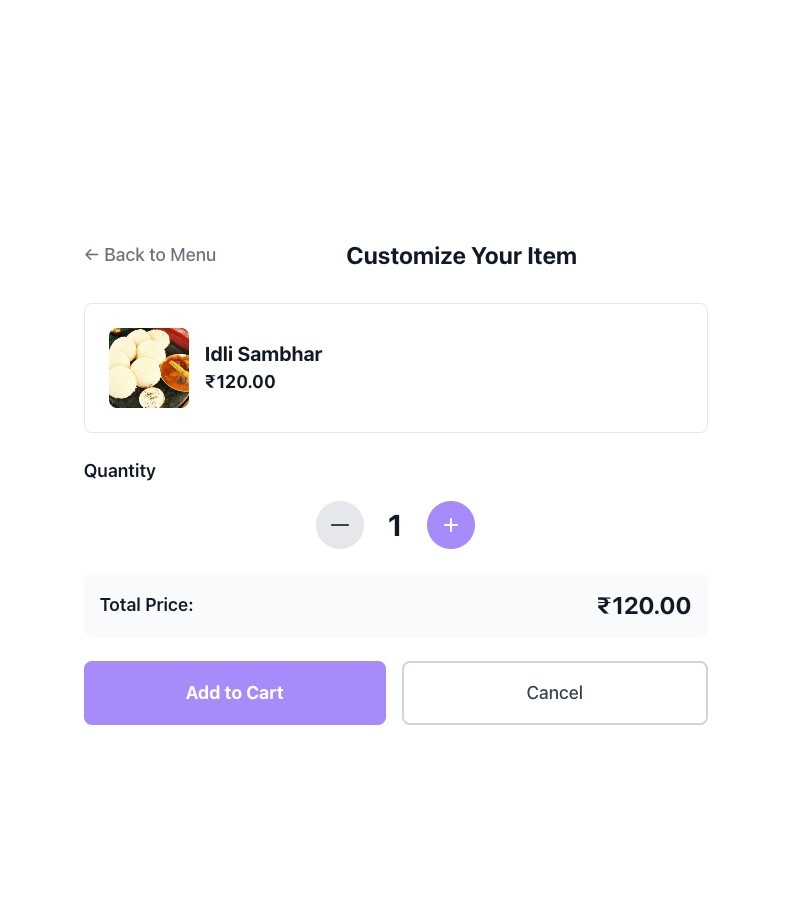
Make It Your Way
Detailed customisation options let customers build their perfect meal — add extras, swap ingredients and see real-time price updates with every change they make.
Toggle add-ons and modifications with a single tap.
Total updates instantly as customers build their order.
Automatic warnings for common allergens in selected items.
 Screenshot 4
Review Before You Confirm
A clear order summary shows every item, customisation and total cost. Customers can easily adjust quantities or remove items before finalising — no more regrets after checkout.
Each item, variant and add-on listed clearly with pricing.
Increase, decrease or remove items with one tap.
Smart recommendations at checkout to boost average order value.
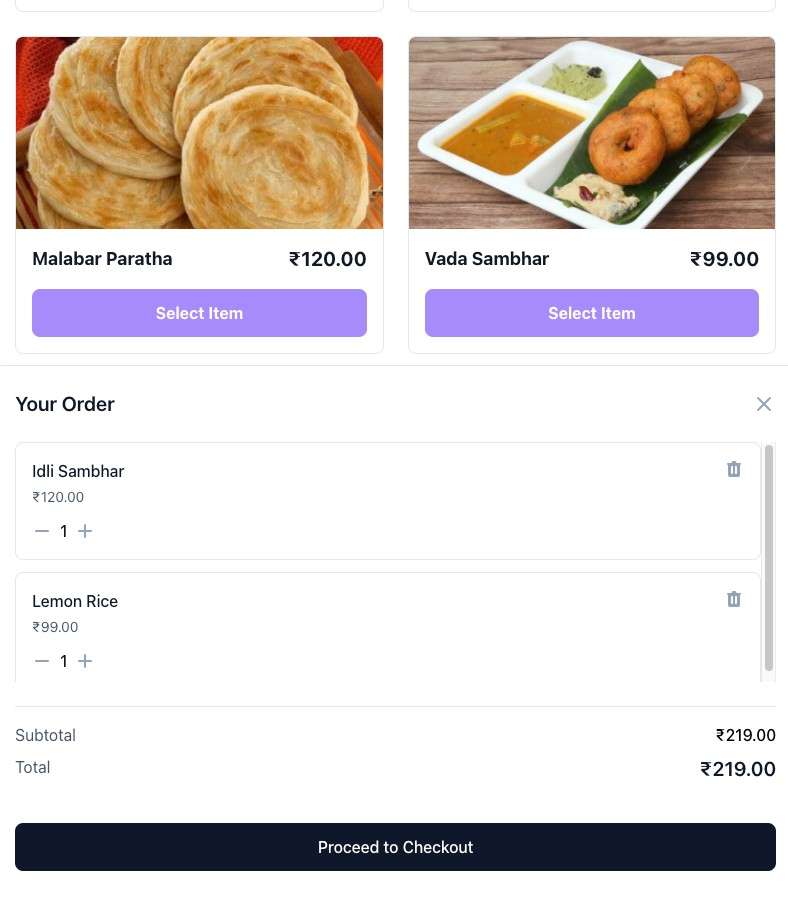 Screenshot 5
Secure, Flexible Payment
Multiple payment options — UPI, card, contactless NFC and cash — ensure every customer can pay their way. Transactions complete in seconds with bank-level encryption.
Tap-to-pay or scan a QR code in seconds.
Chip and PIN, swipe and contactless card payments supported.
All transactions encrypted end-to-end. No card data stored.
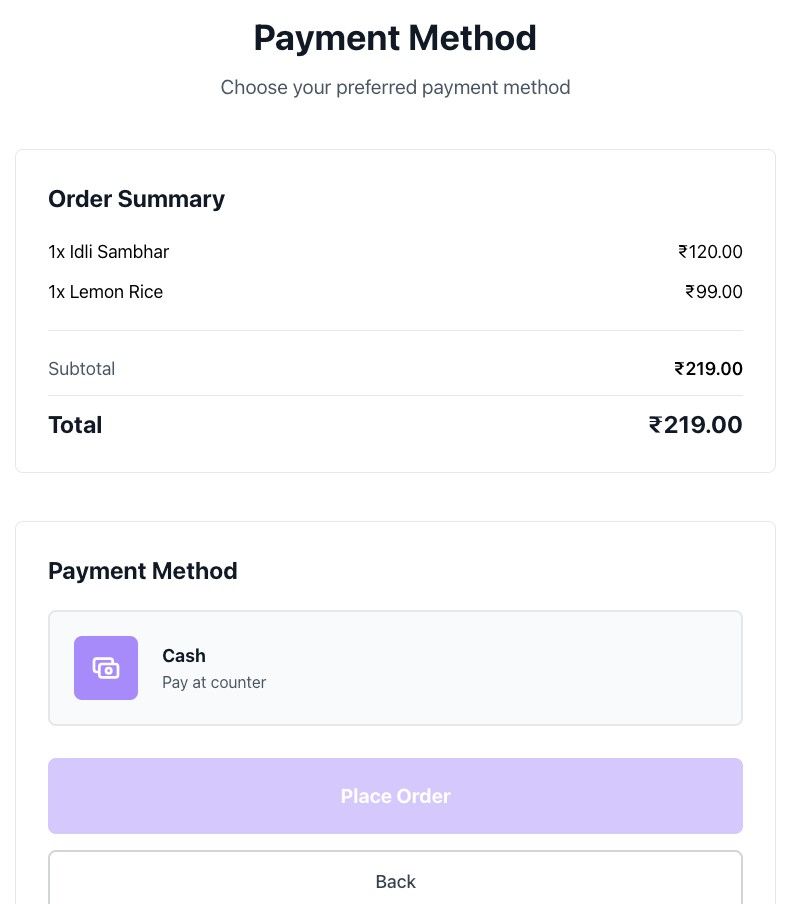 Screenshot 6
Token Issued, Kitchen Notified
A clear confirmation screen displays the order number, estimated preparation time and receipt options. Customers leave the kiosk confident — the kitchen already has their order.
Displayed large on screen and on printed receipt if available.
Kitchen load is calculated and displayed in real time.
KDS and printer receive the ticket the moment payment confirms.
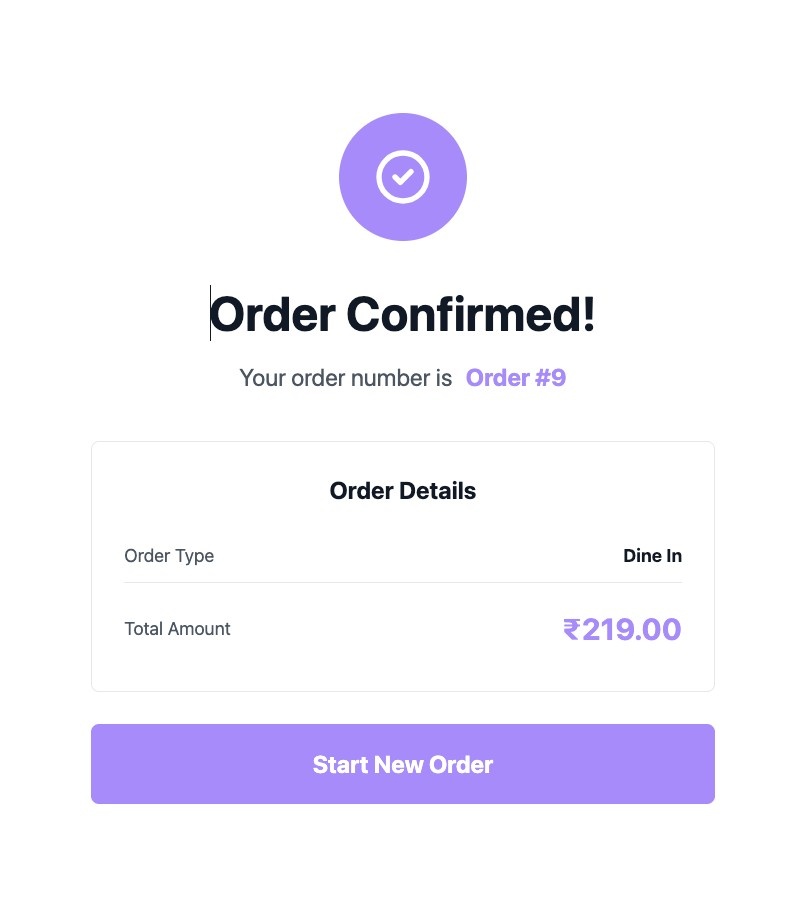 Screenshot 7
Technology
Built for Restaurant Environments
Reliable, secure and designed to run all day, every day without a hiccup.
Works on any tablet, kiosk enclosure or touchscreen — Android, iOS and web browsers all supported out of the box.
Update prices, items and availability from your dashboard. Changes sync to all kiosks in real time — no restarting required.
PCI-DSS compliant with 256-bit encrypted data transmission. Customer payment data is never stored on the kiosk.
Orders flow directly into your existing POS and kitchen display system. No manual re-entry — zero errors and zero delays.
Track top-selling items, peak order hours, average transaction value and upsell performance from a single dashboard.
Our team monitors every kiosk around the clock. Most issues auto-resolve, and a real person responds immediately when they don't.
Benefits
Why Restaurants Choose Our Kiosk
Real-world results that directly impact your revenue and operations.
Ordering is 3x faster than waiting for a member of staff, meaning more covers served during peak hours.
Visual upsell prompts and suggested add-ons increase average order value by 25% on average.
One kiosk can handle the ordering workload of two staff members, freeing your team for service and quality.
Customers enter their own customisations, eliminating miscommunication errors and costly remakes.
No queuing to be served, no waiting for a waiter — customers order at their own pace without feeling rushed.
Touchscreen ordering with sanitised surfaces appeals to health-conscious diners and modern restaurant standards.
Free Plan
₹0.00 Pay Monthly
Best plan to start with. Create menu for your restaurant and let the customers check it out.
Get StartedSilver Plan
₹99.00 Pay Monthly
₹999.00 Pay Annually
Everything in Free + KOT, Waiter Calling, Reservations, Reports, Customer Display System
Get StartedGold Plan
₹199.00 Pay Monthly
₹1,999.00 Pay Annually
Everything in Silver Plan + Inventory, Cash Register, Expenses, Staff Management and Multiple Kitchen
Get StartedPlatinum Plan
₹499.00 Pay Monthly
₹4,999.00 Pay Annually
The complete package with payment gateway integration.
Get StartedBest plan to start with. Create menu for your restaurant and let the customers check it out.
₹99.00 Pay Monthly
₹999.00 Pay Annually
Everything in Free + KOT, Waiter Calling, Reservations, Reports, Customer Display System
₹199.00 Pay Monthly
₹1,999.00 Pay Annually
Everything in Silver Plan + Inventory, Cash Register, Expenses, Staff Management and Multiple Kitchen
₹499.00 Pay Monthly
₹4,999.00 Pay Annually
The complete package with payment gateway integration.
- App Update
-
-
-
-
- Restaurants
-
-
-
-
- Superadmin Payment
-
-
-
-
- Packages
-
-
-
-
- Billing
-
-
-
-
- Offline Request
-
-
-
-
- SuperAdmin
-
-
-
-
- Landing Site
-
-
-
-
- Superadmin Settings
-
-
-
-
- Menu
-
-
-
-
- Menu Item
-
20 per plan
-
500 per plan
-
Unlimited
-
Unlimited
- Item Category
-
-
-
-
- Area
-
-
-
-
- Table
-
-
-
-
- Reservation
-
-
-
-
- KOT
-
-
-
-
- Order
-
-
100 per day
-
Unlimited
-
Unlimited
- Customer
-
-
-
-
- Staff
-
-
Unlimited
-
Unlimited
-
Unlimited
- Report
-
-
-
-
- Delivery Executive
-
-
-
-
- Waiter Request
-
-
-
-
- Expenses
-
-
-
-
- Payment
-
-
-
-
- Settings
-
-
-
-
- Cash Register
-
-
-
-
- Inventory
-
-
-
-
- Kiosk
-
-
-
-
- Multiple Kitchen
-
-
-
-
- permissions.modules.Blog
-
-
-
-
- Loyalty
-
-
-
-
- Hotel
-
-
-
-
Testimonials
Trusted by Restaurants Across India
Hear from owners who transformed their ordering experience with our kiosk.
"The kiosk has transformed our lunch rush. We've seen a 25% increase in average order value and reduced our front-of-house staff by two people. The ROI was immediate."
"Order accuracy improved overnight. No more wrong items or missed customisations. Our kitchen team is happier and service during peak hours is noticeably smoother."
"We installed two kiosks in our food court outlet and the queue is completely gone. Customers love the speed and our staff can finally focus on preparing great food."
FAQ
Frequently Asked Questions
Everything you need to know about implementing a kiosk in your restaurant.
Ready to Transform Your Restaurant?
Join hundreds of restaurants already using OnePe Kiosk to serve more customers, reduce errors and grow revenue — with zero upfront cost.
14-day free trial · No credit card needed · Cancel anytime